


This isn't a generalized blog about AI. Throughout this guide, we'll build a real SaaS product step by step using AI tools, showing the complete workflow from idea validation to generating a working application.
Today, AI tools like ChatGPT, Claude, Gemini, Loveable, Bolt, Codex, and similar AI application builders have completely changed the product development process. Instead of spending weeks planning features or months building an MVP from scratch, you can now generate a working foundation for your product in just a few hours.
We'll use Loveable as our primary AI application builder because it provides generous free credits, making it one of the best platforms for getting started. The same workflow can also be followed using Bolt, Codex, Claude, or other AI builders.
By the end of this guide, you'll have a complete Product Requirement Document (PRD), a working SaaS foundation, demo users, seed data, and a clear understanding of how to move your AI-generated application toward production.
💡 Step 1 – Validate Your Idea ➤
Before opening any AI tool, spend a few minutes validating your idea. AI can generate code quickly, but it still relies on the quality of the information you provide.
Ask yourself the following questions:
- • What problem does your product solve?
- • Who will use your product?
- • Why would someone pay for your solution?
- • How are users solving this problem today?
Don't try to define every feature at this stage. Focus on solving one real problem first. Once the core product is working, additional features can always be added later.
💡 Pro Tip: A well-defined problem statement produces far better AI-generated applications than a long list of random features. Spend time refining your idea before asking AI to generate your project.
⚙️ Step 2 – Choose Your Technology Stack First ➤
One of the biggest mistakes founders make is asking AI to build software without specifying the technology stack. If your prompt is too generic, AI will often make assumptions and add unnecessary frameworks, libraries, and dependencies that make the project harder to maintain.
Choosing your technology stack before writing prompts helps AI generate cleaner architecture, better folder structures, and code that's easier to scale as your product grows.
For most scalable SaaS applications, we recommend the following technology stack:
- • Frontend — Next.js
- • Backend — Node.js
- • Database — MongoDB
- • Authentication — Auth.js
- • Styling — Tailwind CSS
- • State Management — Redux Toolkit
- • Validation — Joi
- • File Storage — Cloudinary
- • Payments — Stripe
For smaller MVPs, internal tools, or proof-of-concept applications, platforms like Supabase and Firebase are excellent alternatives because they provide authentication, databases, storage, and backend services out of the box, allowing you to launch much faster.
💡 Pro Tip: Always include your preferred technology stack in your ChatGPT or AI builder prompt. AI models naturally try to be helpful and may introduce additional frameworks, packages, or dependencies if your requirements are vague. Being explicit keeps your project consistent and much easier to maintain.
🤖 Step 3 – Refine Your Idea with ChatGPT ➤
Before generating your application, use ChatGPT to transform your idea into a detailed Product Requirement Document (PRD). A well-written prompt produces significantly better applications than a short one-line request.
You can use ChatGPT, Claude, or Gemini for this step. In this guide, we're using ChatGPT.
ChatGPT: https://chatgpt.com
Copy and customize the following prompt:
I want to build a SaaS product.
My idea is:
[Describe your SaaS idea]
Act as an experienced SaaS Product Manager and Software Architect.
Transform my idea into a production-ready Product Requirement Document (PRD).
Please provide:
• Improve my idea
• Identify missing features
• Define only the MVP features
• Remove unnecessary complexity
• Suggest user roles
• Suggest dashboards for every role
• Create database entities
• Suggest APIs
• Define user journeys
• Suggest third-party integrations
• Recommend security considerations
Preferred Technology Stack
Frontend: Next.js
Backend: Node.js
Database: MongoDB
Authentication: Auth.js
Styling: Tailwind CSS
State Management: Redux Toolkit
Validation: Joi
Return everything as a detailed Product Requirement Document that can be directly provided to an AI application builder.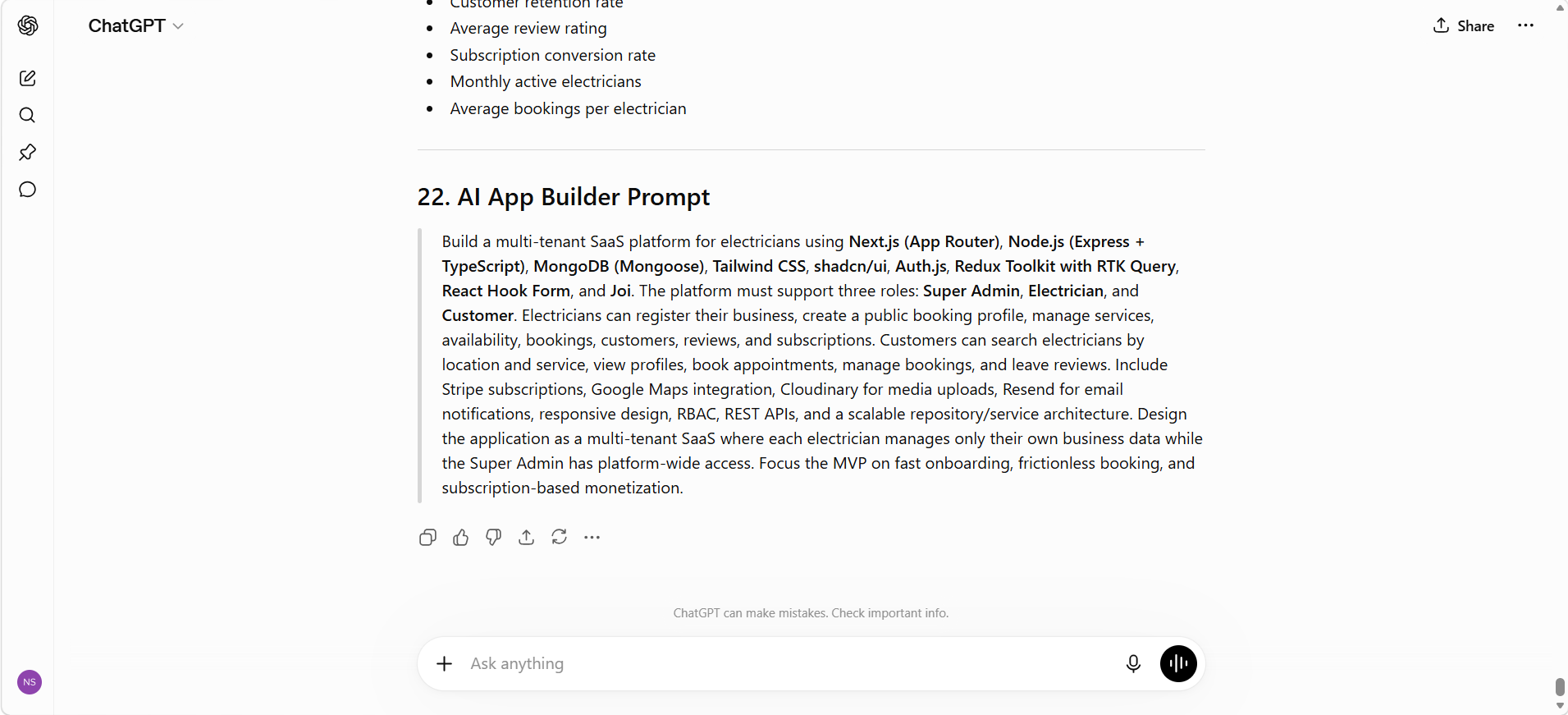 Figure 1: Prompt to make prompt better
Carefully review the generated PRD and make changes if necessary before moving to the next step. A better PRD usually results in a much better application.
🚀 Step 4 – Generate Your Application with Loveable ➤
Once your Product Requirement Document is ready, copy it into Loveable. Although you can use Bolt, Codex, Claude, or other AI application builders, we're using Loveable because it provides generous free credits to help you get started.
Loveable: https://lovable.dev
Instead of asking Loveable to generate a simple landing page, ask it to build a complete SaaS foundation that you can continue improving.
Use the following prompt below the prompt created by chatgpt:
Using the attached Product Requirement Document, build a complete SaaS application.
Requirements:
• Follow the PRD exactly.
• Use the specified technology stack.
• Create a clean folder structure.
• Build responsive pages.
• Implement authentication.
• Create dashboards for every user role.
• Build CRUD functionality.
• Create reusable components.
• Add loading states.
• Add proper form validation.
• Generate realistic seed data.
• Create demo users for every role.
• Provide login credentials for every role.
• Include a registration page.
• Display the registration URL.
• Follow production-ready coding standards.
At the end provide:
• Demo login credentials
• User roles
• Registration link
• Project structure
• Recommended next improvements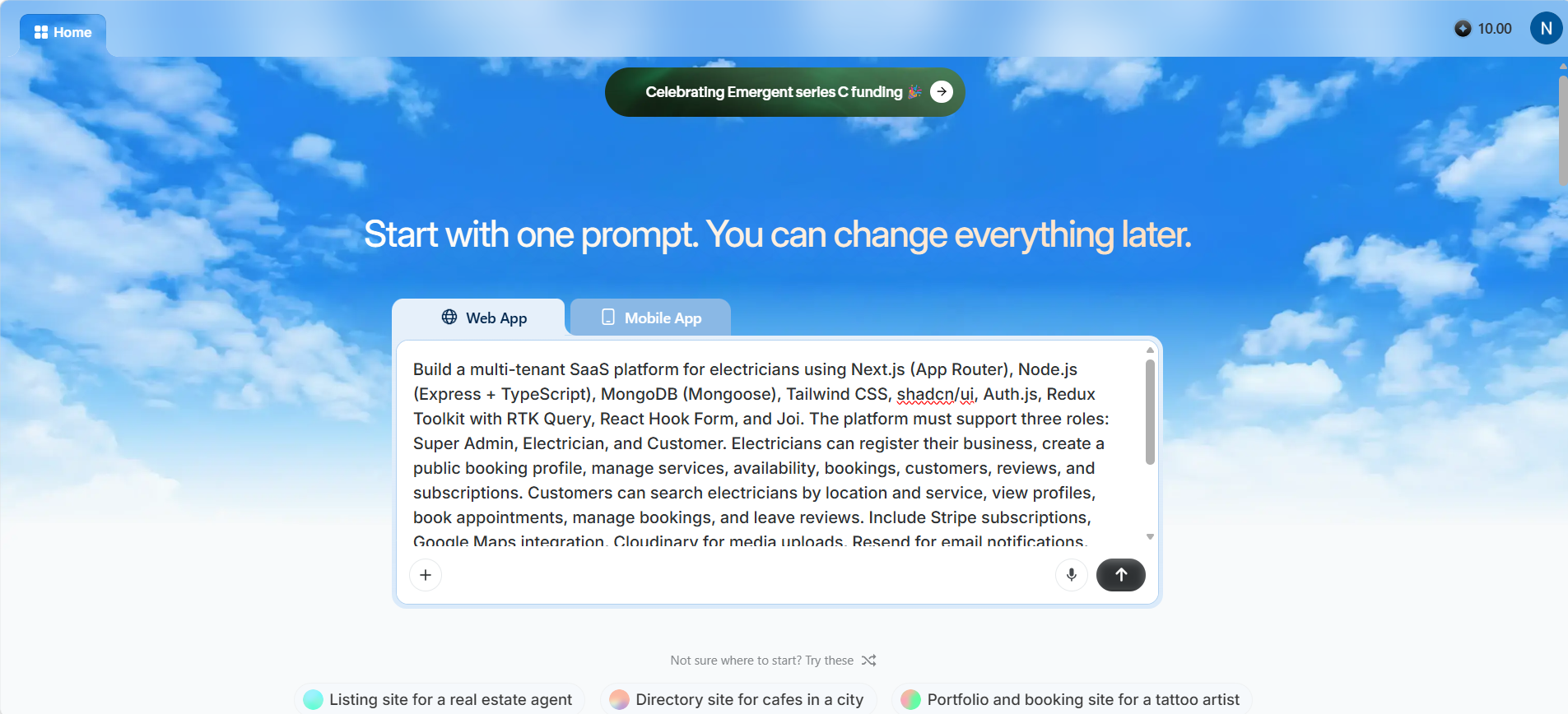 Figure 2
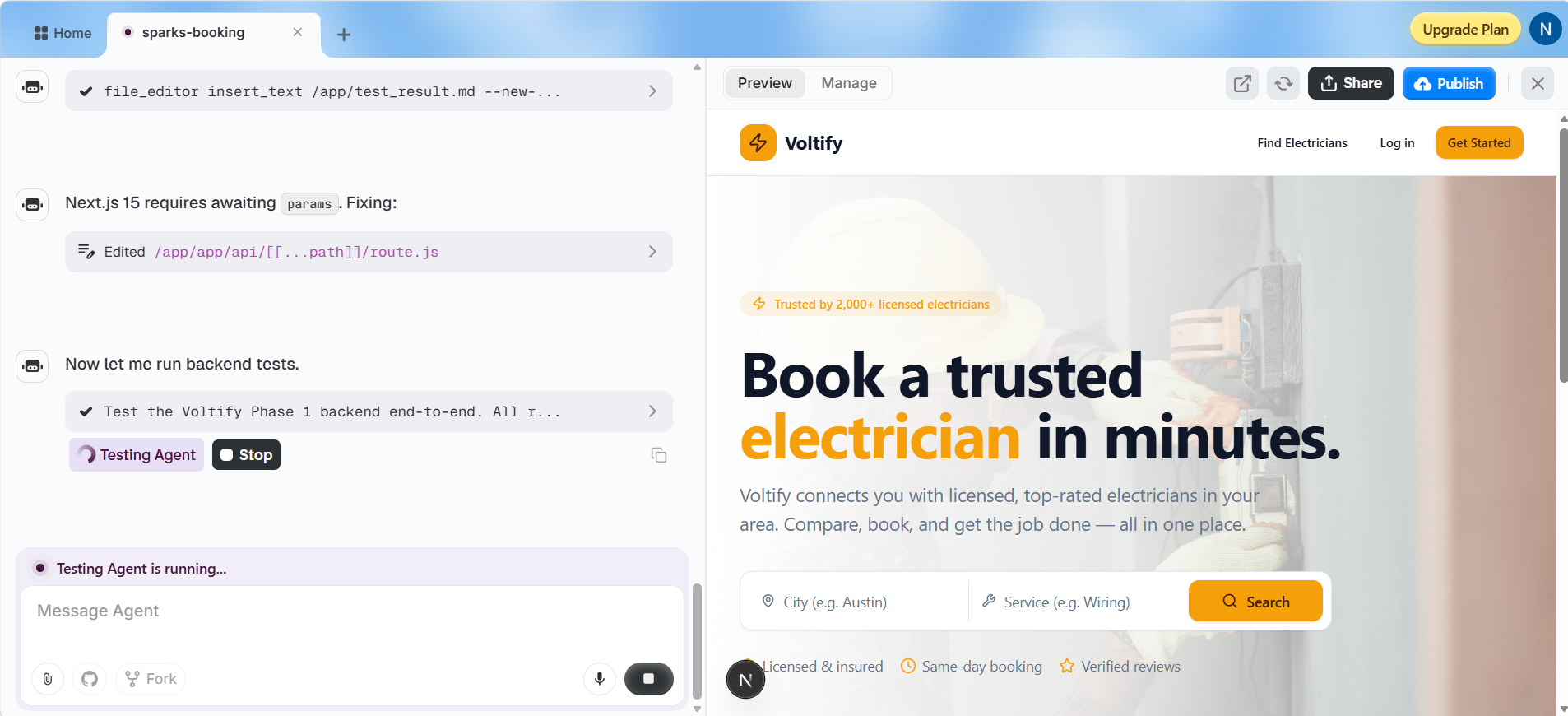 Figure 3
One of the biggest advantages of AI application builders is that they can generate realistic demo data automatically. Instead of manually creating users and records, ask AI to generate sample data so you can immediately test every workflow.
Make sure your generated application includes:
- • Demo users for every role
- • Login credentials
- • Registration page
- • Seed database records
- • Sample dashboard data
 Figure 4: Loveable generates a complete SaaS foundation including
authentication, dashboards, CRUD functionality, and demo data.
Figure 4: Loveable generates a complete SaaS foundation including
authentication, dashboards, CRUD functionality, and demo data.
🏗️ Step 5 – Choose How You Want to Start ➤
Once Loveable generates your application, there are two common approaches depending on your goal.
Option 1 — Build an Incomplete Prototype
This approach is perfect for validating ideas, demonstrating concepts to investors, or collecting feedback before investing more time in development.
- • Authentication
- • Landing page
- • Basic dashboard
- • Core user flow
- • Responsive design
Option 2 — Complete Base Version (Recommended)
We recommend generating a complete application foundation rather than a simple prototype. This gives you a much stronger starting point for future development.
- • Authentication
- • User management
- • Role-based dashboards
- • Database integration
- • CRUD operations
- • Reusable components
- • Seed data and demo users
Starting with a complete base version saves significant development time and makes future enhancements much easier.
🧪 Step 6 – Test and Improve Your Application ➤
Your AI-generated application may already look impressive, but don't consider it production-ready yet. Spend time testing every important workflow before moving to the next stage.
Review both functionality and user experience to identify issues early. It's much easier to improve the application now than after real users start using it.
Test the following areas:
- • User registration and login
- • Authentication and authorization
- • Dashboard navigation
- • CRUD operations
- • Forms and validation
- • Database operations
- • Responsive design
- • Performance and loading speed
Don't regenerate the entire project every time you discover an issue. Instead, ask the AI to improve specific modules or features.
For example, you can ask it to:
- • Improve the dashboard UI
- • Add pagination and filters
- • Optimize the database schema
- • Improve authentication
- • Add email verification
- • Implement forgot password
- • Improve mobile responsiveness
💡 Pro Tip: AI performs much better when improving an existing application than rebuilding everything from scratch. Small, focused prompts almost always produce better results.
🚀 Step 7 – Move Your Application to Production ➤
This is where many founders make a costly mistake. AI can generate an excellent starting point, but production software requires much more than working screens.
Before launching your SaaS, make sure your application includes:
- • Secure authentication
- • Role-based access control
- • API security
- • Database optimization
- • Proper error handling
- • Performance optimization
- • Logging and monitoring
- • Automated testing
- • Secure deployment
- • Backup and recovery strategy
AI builders create an excellent foundation, but experienced software engineers ensure your application is secure, scalable, maintainable, and ready for real customers.
How Weblianz Solutions Can Help ➤
At Weblianz Solutions, we help startups and businesses transform AI-generated applications into secure, scalable, production-ready SaaS platforms.
Our team can help with:
- • Product architecture
- • Next.js & Node.js development
- • MongoDB database optimization
- • Authentication & authorization
- • Payment gateway integration
- • Third-party API integrations
- • AI integrations
- • Performance optimization
- • Security hardening
- • Cloud deployment
- • Long-term maintenance and support
Instead of rebuilding your AI-generated project from scratch, we improve its architecture, optimize the codebase, strengthen security, and prepare it for production while preserving the progress you've already made.
⚠️ Common Mistakes to Avoid ➤
- • Skipping idea validation
- • Using vague AI prompts
- • Not specifying the technology stack
- • Trying to generate everything in one prompt
- • Ignoring testing and user feedback
- • Deploying AI-generated code directly to production
- • Ignoring scalability and security
🏁 Final Thoughts ➤
AI has fundamentally changed how software is built. Tools like ChatGPT, Claude, Gemini, Loveable, Bolt, and Codex enable founders to transform ideas into working SaaS applications much faster than ever before.
The workflow is simple:
Validate your idea → Choose your technology stack → Generate a PRD with ChatGPT → Build your application with Loveable → Test and improve → Prepare it for production.
AI dramatically reduces development time, but combining it with proper planning and experienced engineering is what transforms a prototype into a successful SaaS product.
Need Help Building Your SaaS? ➤
Whether you have just an idea or already have an AI-generated application, Weblianz Solutions can help you turn it into a secure, scalable, production-ready SaaS platform.
From product planning and architecture to custom development, AI integrations, security, deployment, and long-term support, we'll help you build software that's ready for real users.
Ready to build your SaaS?
Contact Weblianz Solutions and let's transform your idea
into a production-ready application.