




`
Pocket Backend: React Native CRUD with Supabase build a Complete CRUD App is a practical walkthrough for turning a blank mobile project into a fully data-driven application backed by a modern cloud database. You will connect React Native screens to Supabase to handle creating, reading, updating, and deleting records through clean, type-safe API calls. By the end, you will have a production-ready CRUD foundation that feels as simple as working with local state, but powered by a scalable, hosted backend.
1.Create a new Expo app (using a blank TypeScript template):
npx create-expo-app my-supabase-app --template blank-typescriptcd my-supabase-appnpm install @supabase/supabase-js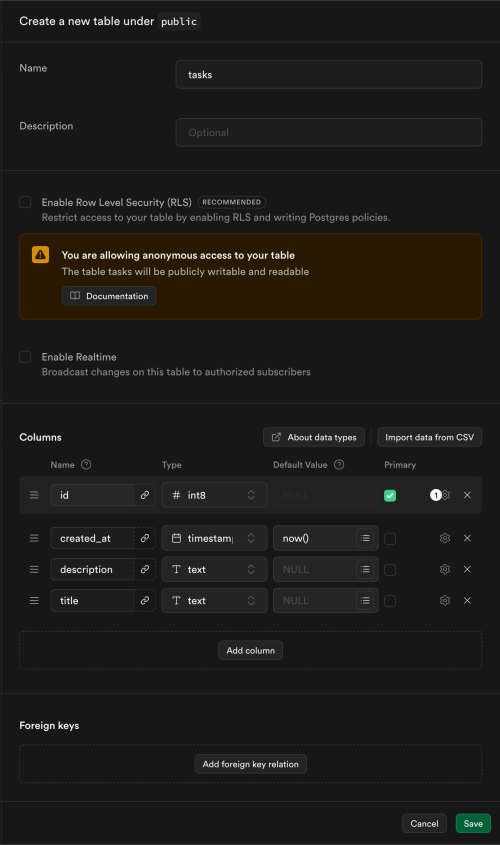 5. Now create a file supabase-client.ts
import { createClient } from '@supabase/supabase-js';

// Replace with your actual Supabase URL and public anon key
const supabaseUrl = 'https://xyzcompany.supabase.co';
const supabaseAnonKey = 'public-anon-key';

export const supabase = createClient(supabaseUrl, supabaseAnonKey);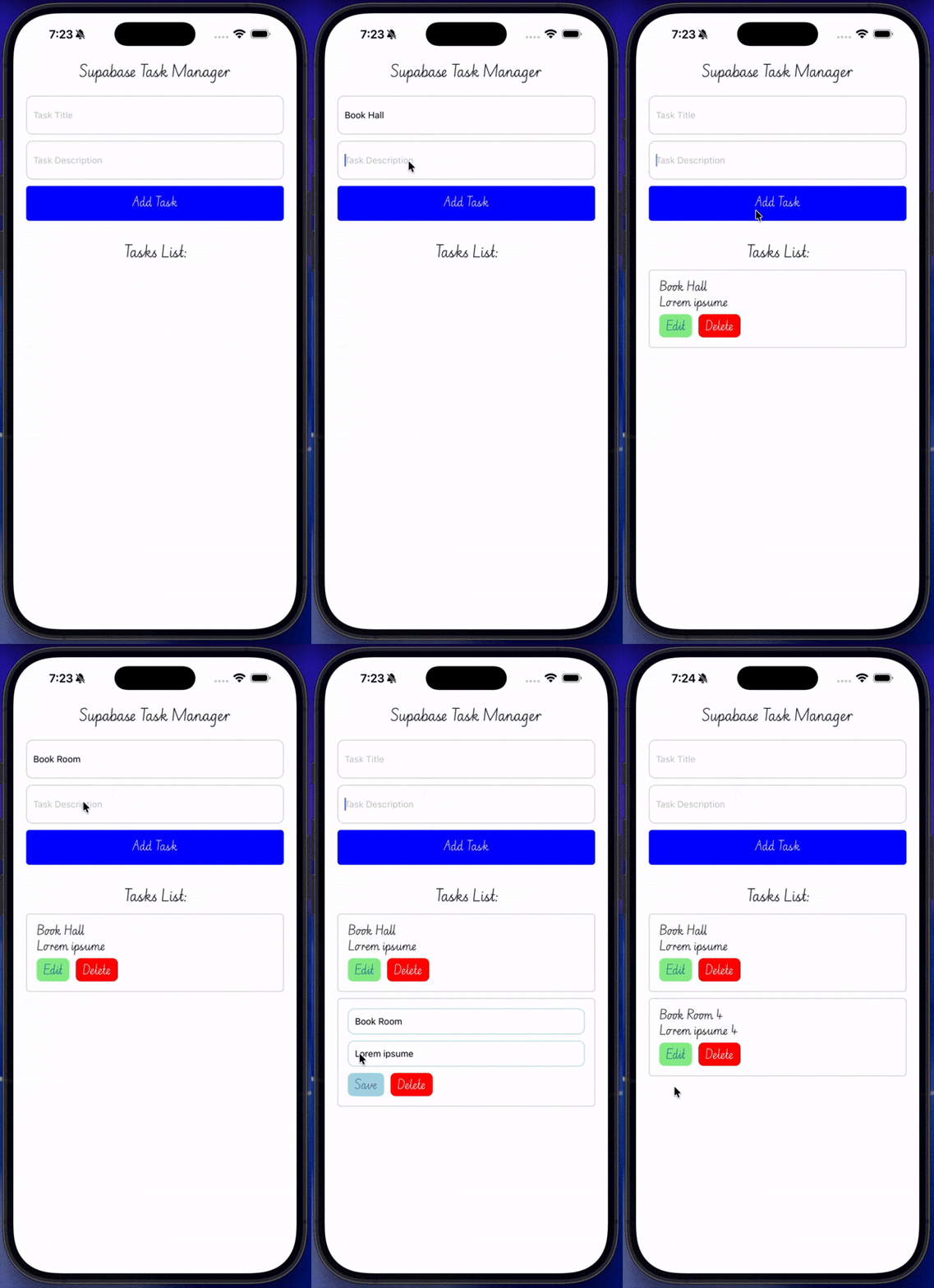
App.tsx
import React, { useState } from 'react';
import {StyleSheet,TextInput,TouchableOpacity,View,Text } from 'react-native';
import { supabase } from './supabase-client';

const App = () => {

const [newTask, setNewTask] = useState({ title: '', description: '' });

  const handleSubmit = async () => {
    // Create the new task into the Supabase "tasks" table
    const { data, error } = await supabase.from("tasks").insert(newTask).single();

    if (error) {
      console.log("Error inserting task:", error);
    } else {
      console.log("Task inserted successfully:", data);
    }
    // Clear the input fields after submission
    setNewTask({ title: '', description: '' })
  }

 return (
    <View style={[styles.container, { padding: 50,  flexDirection: 'column'  }]}>
    <Text style={{ textAlign: 'center'}}>Supabase Task Manager  </Text>
    <View style={{ marginTop: 20, gap: 10 }}>
    <TextInput
        value={newTask.title}
        style={{ height: 40, borderColor: 'gray', borderWidth: 1, padding: 10 }}
        placeholder="Task Title"
        onChangeText={(text) => setNewTask((prev) => ({ ...prev, title: text }))}
    />
    <TextInput
        value={newTask.description}
        onChangeText={(text) =>
        style={{ height: 40, borderColor: 'gray', borderWidth: 1, padding: 10 }}
        placeholder="Task Description"
        setNewTask((prev) => ({ ...prev, description: text }))}
    />
    <TouchableOpacity
        onPressIn={handleSubmit}
        style={{ backgroundColor: 'blue', padding: 15, borderRadius: 5 }} >
        <Text style={{ color: 'white', textAlign: 'center' }}>Add Task</Text>
    </TouchableOpacity>
    </View>
    </View>
  )
}

export default App

const styles = StyleSheet.create({
  container: {
    flex: 1,
    flexDirection: 'row',
  }
})const fetchTasks = async () => {
// Read tasks from Supabase to refresh the list after insertion
const { data, error } = await supabase.from("tasks").select("*");
if (error) {
console.log("Error fetching task:", error);
return
} else {
console.log("Task fetched successfully:", data);
}
setTask(data)
}const updateTask = async (id: number, updatedTask: { title?: string; description?: string }) => {
// Update a task in Supabase by its ID
const { data, error } = await supabase.from("tasks").update(updatedTask).eq("id", id);
if (error) {
console.log("Error updating task:", error);
return
}
}const deleteTask = async (id: number) => {
// Delete a task from Supabase by its ID
const { data, error } = await supabase.from("tasks").delete().eq("id", id);
if (error) {
console.log("Error deleting task:", error);
return
}
}import React, { useEffect, useState } from 'react';
import {StyleSheet,TextInput,TouchableOpacity,View,Text,FlatList} from 'react-native';
import { supabase } from './supabase-client';
interface Task {
id: number;
title: string;
description: string;
created_at: string;
}
const App = () => {
const [newTask, setNewTask] = useState({ title: '', description:''});
const [updateTaskText, setUpdateTaskText] = useState({ title: '', description:''});
const [task, setTask] = useState<Task[]>([]);
const [isUpdatingById, setIsUpdatingById] = useState<number | null>(null);
const fetchTasks = async () => {
    // Read tasks from Supabase to refresh the list after insertion
    const { data, error } = await supabase.from("tasks").select("*");
    if (error) {
      console.log("Error fetching task:", error);
      return
    } else {
      console.log("Task  fetched successfully:", data);
    }
     setTask(data)
  }
useEffect(() => {
// Fetch tasks when the component mounts
fetchTasks();
}, [])
const deleteTask = async (id: number) => {
// Delete a task from Supabase by its ID
const { data, error } = await supabase.from("tasks").delete().eq("id", id);
if (error) {
console.log("Error deleting task:", error);
return
}
fetchTasks();
}
const updateTask = async (id: number, updatedTask: { title?: string; description?: string }) => {
// Update a task in Supabase by its ID
const { data, error } = await supabase.from("tasks")
.update(updatedTask)
.eq("id", id);
if (error) {
console.log("Error updating task:", error);
return
}
fetchTasks();
}
const handleSubmit = async () => {
// Create the new task into the Supabase "tasks" table
const { data, error } = await supabase.from("tasks").insert(newTask).single();
if (error) {
console.log("Error inserting task:", error);
} else {
console.log("Task inserted successfully:", data);
fetchTasks();
}
setNewTask({ title: '', description: '' })
}
return (
<View style={styles.container}>
<Text style={{ textAlign: 'center' }}>Supabase Task Manager </Text>
<View style={{ marginTop: 20, gap: 10 }}>
<TextInput
value={newTask.title}
style={styles.inputStyle}
placeholder="Task Title"
onChangeText={(text) =>
setNewTask((prev) => ({ ...prev, title: text }))}
/>
<TextInput
value={newTask.description}
style={styles.inputStyle}
placeholder="Task Description"
onChangeText={(text) =>
setNewTask((prev) => ({ ...prev, description: text }))}
/>
<TouchableOpacity
onPressIn={handleSubmit}
style={{ backgroundColor: 'blue', padding: 15, borderRadius: 5 }} >
<Text style={{ color: 'white', textAlign: 'center' }}>Add Task</Text>
</TouchableOpacity>
</View>
<Text style={{ marginTop: 30, textAlign: 'center' }}>Tasks List:</Text>
<FlatList
data={task}
keyExtractor={(item) => item.id.toString()}
renderItem={({ item }) => (
<View key={item.id} style={styles.flatListView}>
{isUpdatingById === item.id ? (
<TextInput
defaultValue={item.title}
placeholder="Task Title"
style={styles.inputStyle}
onChangeText={(text) =>
setUpdateTaskText((prev) => ({ ...prev, title: text }))}
/>
) : (
<Text>{item.title}</Text>
)}
{isUpdatingById === item.id ? (
<TextInput
style={styles.inputStyle}
placeholder="Task Description"
defaultValue={item.description} onChangeText={(text) =>
setUpdateTaskText((prev) => ({ ...prev, description: text }))}
/>
) : (
<Text>{item.description}</Text>
)
}
<View style={{ marginTop: 5, gap: 10, flexDirection: 'row' }}>
{isUpdatingById === item.id ? (
<TouchableOpacity
style={[styles.btnStyle, { backgroundColor: 'lightblue' }]}
onPressIn={() => {
setIsUpdatingById(null);
updateTask(item.id, updateTaskText);
}}>
<Text >Save</Text></TouchableOpacity>
) :
<TouchableOpacity
style={[styles.btnStyle, { backgroundColor: 'lightgreen' }]}
onPressIn={() => {
setIsUpdatingById(item.id);
}}>
<Text >Edit</Text></TouchableOpacity>
}
<TouchableOpacity
style={[styles.btnStyle, { backgroundColor: 'red' }]}
onPressIn={() => deleteTask(item.id)}
>
<Text style={{ color: 'white', fontWeight: 'bold' }}>Delete</Text>
</TouchableOpacity>
</View>
</View>
)}
/>
</View>
)
}
export default App
const styles = StyleSheet.create({
container: {
flex: 1,
flexDirection: 'row',
},
flatListView: {
padding: 15,
borderWidth: 1,
borderColor: '#ccc',
borderRadius: 5,
marginTop: 10
},
inputStyle: {
height: 40,
borderColor: '#ccc',
borderWidth: 1,
padding: 10,
marginBottom: 10,
borderRadius: 10
},
btnStyle: {
padding: 3,
paddingInline: 10,
borderRadius: 8
}
})