




Dynamics 365 Business Central Cost in 2026: The Real Numbers

If you've started pricing out Dynamics 365 Business Central, you've probably run into the same frustration everyone does: the license price is easy to find, and the total cost is almost impossible to pin down. Microsoft publishes a clean per-user number, but that figure is only the visible tip of the budget. The part that actually determines what you'll spend — implementation, data migration, integrations, training, and ongoing support — is exactly the part nobody quotes up front.
So let's do the useful version. This guide lays out the real 2026 numbers: what the licenses cost, what a realistic implementation runs by company size, the hidden costs that catch teams off guard, and how to keep the whole thing under control. The goal is to give you a defensible budget before you ever sit down with a partner.
The License Prices: The Easy Part
Business Central is licensed per user, per month, billed annually, and it comes in a few tiers. As of Microsoft's pricing update effective November 1, 2025, the current US list prices are:
- ● Essentials — $80 per user/month
- ● Premium — $110 per user/month
- ● Team Members — $8 per user/month
- ● Device license — around $40–$45 per device/month (shared, for shift or shop-floor workers)
Essentials covers the core that most businesses need: finance, sales, purchasing, inventory, warehousing, and project management. Premium adds manufacturing and service management on top of everything in Essentials. Team Members is a light license for people who only need to read data, approve items, or enter time — not run the system. One important rule: you can't mix Essentials and Premium full users in the same environment, so you pick the tier that fits your most demanding users.
Match the License to the User — This Is Where Money Is Saved
The single easiest way to waste money on Business Central is buying full licenses for people who don't need them. Not everyone touching the system is a full user. The warehouse manager configuring inventory needs Essentials; the department head who just approves purchase orders and glances at a report is a perfect fit for the $8 Team Members license.
The savings from getting this mix right are real. A team that thoughtfully splits its users between full and light licenses, rather than defaulting everyone to Essentials, can cut its monthly licensing bill substantially. Before you sign anything, map every user to what they actually do in the system — it's the highest-return five minutes in the whole budgeting process.
Contract Terms Change the Price Too
How you commit affects the rate. Monthly billing is the most flexible but costs roughly 20% more than an annual commitment. Annual is the most common choice. And a three-year term locks in today's rate — worth considering given that Microsoft raised prices in late 2025 and periodic increases are the norm, not the exception. If you're confident in the platform, locking the rate protects you from the next hike.
Implementation: Where the Real Money Lives
Here's the number most budgets underestimate, because it's separate from and usually larger than the first year of licensing. Implementation covers everything required to actually get the system running for your business: discovery and requirements, configuration, migrating your data from old systems, building integrations, testing, training, and go-live support.
Costs scale with company size and complexity. As a realistic 2026 picture:
- ● Small / straightforward deployments — roughly $25,000–$75,000
- ● Mid-market structured deployments — roughly $75,000–$200,000
- ● Enterprise / multi-entity transformations — $200,000 and up, sometimes far higher for global, multi-country rollouts
Simpler projects — a single company, core finance, minimal customization — sit at the low end. What pushes a project up the range is custom development, messy data that needs heavy migration work, integrations with other systems, and the number of departments and users involved.
Realistic Timelines
Budget your calendar as carefully as your money. Small businesses typically go live in around 2–4 months. Mid-market companies usually take 4–6 months. Large or highly customized enterprise projects can run 6–12 months or more. A partner promising an enterprise-grade rollout in a few weeks is a warning sign, not a bargain — rushed discovery and skipped data cleanup are the most common causes of painful go-lives.
A Real-World Example
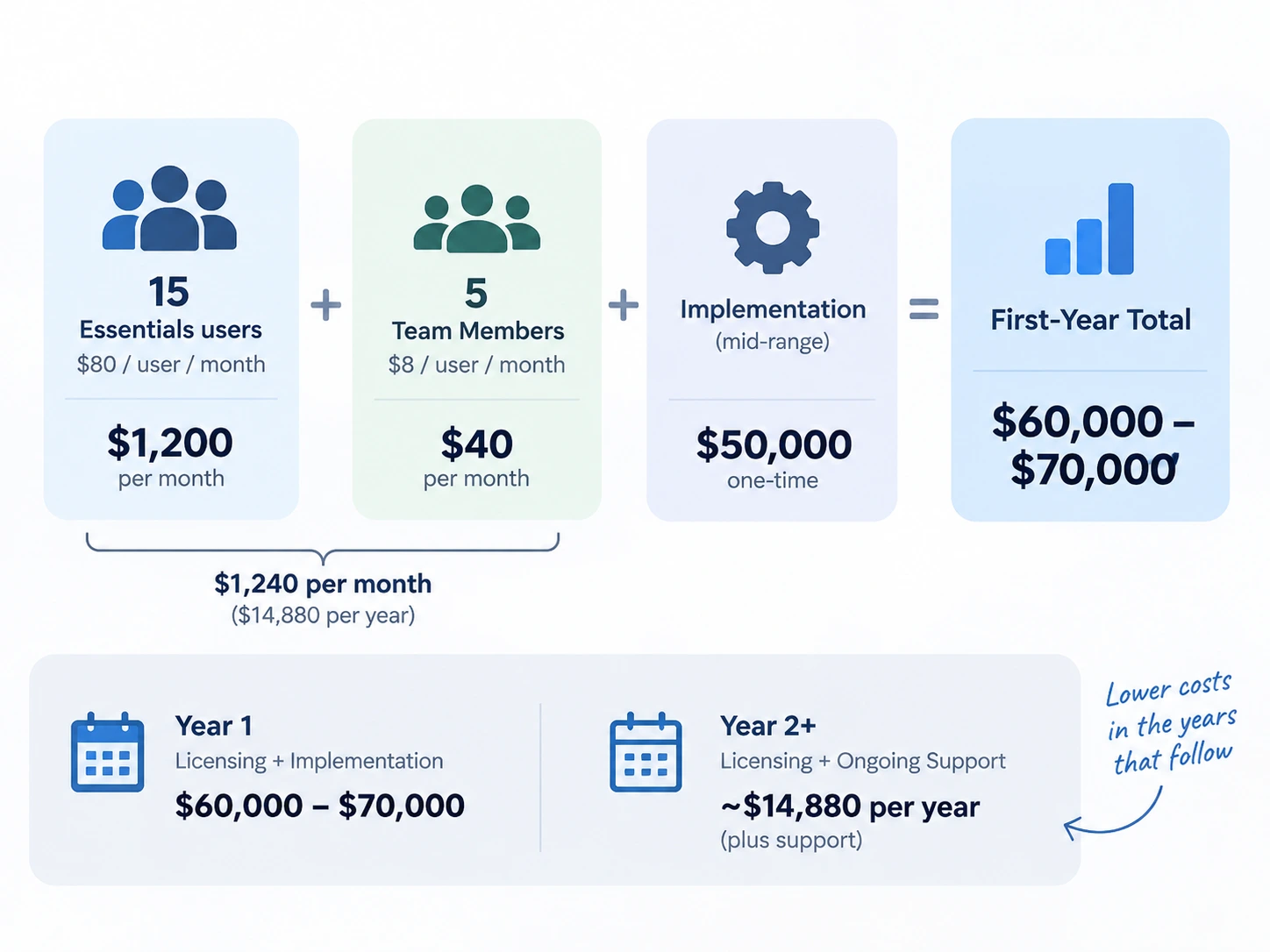
To make it concrete: picture a 20-person mid-sized business. Say 15 people need full Essentials access and 5 only need Team Members. That's (15 × $80) + (5 × $8) = $1,240 a month in licensing, about $14,880 a year. Add a mid-range implementation of, say, $50,000, and the first-year total lands somewhere around $60,000–$70,000. Year two, once implementation is behind you, drops back toward the licensing plus ongoing support. This is why year one always looks dramatically more expensive than the years that follow — and why judging the platform on the first year's number alone is misleading.
The Hidden Costs Nobody Quotes
Beyond licenses and implementation, a few line items routinely surprise people:
- ● Ongoing support and managed services — typically budgeted at roughly 15–25% of the implementation cost per year, for updates, fixes, and help as your needs evolve.
- ● Storage overages — each tenant gets a base storage allowance plus a per-user amount; heavy data use can push you into paid overage.
- ● Third-party apps and add-ons — most businesses end up adding a few from Microsoft's marketplace, each with its own subscription.
- ● Customization and integration maintenance — anything custom-built needs upkeep as Business Central updates.
- ● Training — often folded into implementation, but deeper or ongoing training can be a separate cost.
None of these are optional surprises so much as predictable parts of running an ERP. The businesses that stay on budget are the ones that planned for all of them from day one, rather than discovering them at renewal.
How to Control the Total Cost
You have more influence over the final number than the sticker price suggests — and most of it comes from decisions made before implementation, not from negotiating the license rate.
Right-size your license mix so you're not paying full price for light users. Clean up your data before migration, since consultants bill for the time spent untangling messy records. Scope the project tightly, because vague requirements are the number-one cause of budget overruns. Consider a phased rollout — start with finance and core operations, then add manufacturing or advanced modules later — which spreads cost and lowers risk. And commit annually or for three years if you're confident, to secure the better rate. A licensing and scoping conversation before implementation, rather than after, is the highest-leverage cost-saving step most businesses skip entirely.
Frequently Asked Questions
- ● How much does Business Central cost per user? As of Microsoft's November 2025 US list pricing: Essentials $80/user/month, Premium $110/user/month, Team Members $8/user/month, Device licenses around $40–$45/month — all billed annually. Regional pricing and negotiated terms can vary.
- ● Essentials or Premium? Essentials suits most distribution, services, and retail businesses. Choose Premium only if you need manufacturing or service management modules.
- ● What does implementation cost for a mid-sized company? Commonly $75,000–$200,000 depending on complexity, users, and how much customization and integration is involved — separate from licensing.
- ● Can I upgrade from Essentials to Premium later? Yes. You can move individual users up without re-implementing the whole system.
- ● How long does it take? Roughly 2–4 months for small businesses, 4–6 for mid-market, and 6–12+ for large or complex deployments.
Final Thought
Dynamics 365 Business Central isn't a single price; it's a stack — licenses, implementation, support, and the smaller costs around them. The businesses that budget well treat every quote as a scoping conversation first and a price comparison second, right-size their license mix, and plan for the full multi-year cost rather than the monthly sticker. Get those three things right and Business Central becomes one of the more predictable ERP investments available to a growing company.
At Weblianz, that's exactly how we approach ERP and business software work: understand the real problem before proposing a build, size it honestly, and stay in the relationship long after go-live instead of treating launch as the finish line. If you want a realistic estimate for a Business Central project — with no inflated quotes and no surprise line items down the road — the most useful first step is just talking it through.
Book a free consultation, or start a chat with us — no pressure, just a straight, honest read on what your project should really cost.

Comments
Rachel Kimani
We defaulted everyone to Essentials before reading something like this. Splitting out Team Members licenses for our approvers alone would have cut a real chunk off the monthly bill.
ReplyVictor Alaniz
The year-one-vs-year-two math finally explained why our first invoice looked so much scarier than what our peers were quoting us for "the same thing."
ReplyInes Kowalska
Nobody mentioned storage overages to us until we hit them. Small line item, but it was still a surprise on the renewal invoice.
ReplyDevon Marsh
Locking a three-year rate before the next price increase seems obvious in hindsight. We went monthly for flexibility and paid for it.
ReplyTanya Reyes
Phasing the rollout — finance first, manufacturing later — was the single best call we made. Kept the budget and the risk both manageable.
ReplyRachel Kimani
We did the same phased approach and it made the go-live so much less stressful than trying to do everything at once.
ReplyLeave a Comment
Your email address will not be published. Required fields are marked *